Getting started · 3 min
Welcome to Micolpe
Micolpe brings your loft, pigeons, pedigrees, pairings, races and creative work into one environment available on Android and Windows.

01One account
Find the same data on your phone and computer.
02Work offline
Keep working without internet, then synchronize later.
0315-day trial
Explore the essential features before activating your subscription.
TipCreate your account first, then complete your loft information before adding pigeons.
Account · 4 min
Create your account
Your Micolpe account protects your data and makes it available on your authorized devices.
1Open registration
From the app or website, select “Create account” and enter a valid email address.
Confirm your email
Open the message from Micolpe and use the confirmation link.
Sign in
Return to Micolpe using your email and password.
Complete your loft
Add your loft name, contact information and the details to show on pedigrees.
Android · 5 min
Discover the Mobile App
Take your loft everywhere: viewing, entry, scanning, racing tools and synchronization are available on Android.

Your loft in your pocket
- View and add pigeons to your loft.
- Write and preview pedigrees.
- Prepare pairings and racing tools.
- Work offline while travelling.
- Synchronize with the Windows version.
Download Micolpe
Loft · 6 min
Add a Pigeon
Create a clear record for every pigeon and connect its parents to build its genealogy automatically.

1Open “My pigeons”
Use the add button from the pigeon list.
Enter the ring
Add the year, country, number, sex and available details.
Select the parents
Choose existing parents or complete the ancestry in the pedigree editor.
Save
The record becomes available on your devices after synchronization.
Pedigree · 8 min
Scan a Pedigree
Import a photo or PDF, frame the document boxes, then reuse the recognized information in your Micolpe pedigree.
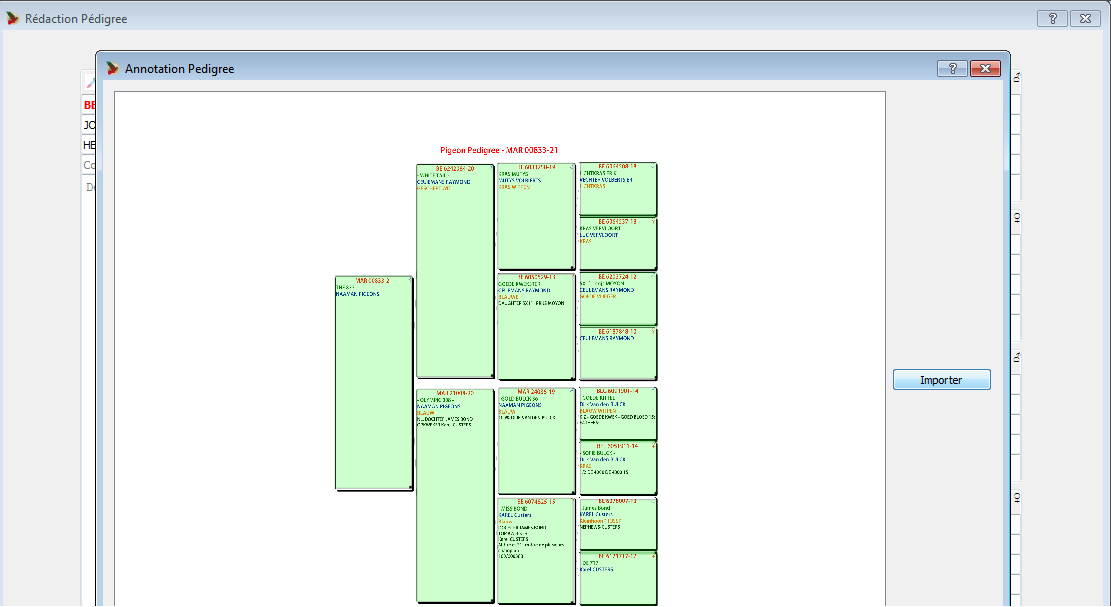
1Import the document
Select a sharp image or readable PDF.
Frame the boxes
Mark the pigeon, parents and ancestor areas.
Check the data
Review ring numbers and correct details before saving.
For better readingPhotograph the pedigree flat, without shadows, in even light and with every edge visible.
Authenticity · 3 min
Pedigree QR Verification
The QR printed on a Micolpe pedigree opens its public verification page and confirms the shared information.

01Enable the QR
Turn on the verification code in the pedigree settings.
02Scan and verify
The reader opens the pigeon’s verification page without giving access to your account.
Creation · 7 min
Micolpe Poster Studio
Present champions, breeders or sale pigeons in a professional composition prepared for print and sharing.

01Choose the pigeon
Its record and pedigree information are carried into the project.
02Compose the poster
Add layers, text, pictures, achievements and loft elements.
03Export in HD
Save the project and export the final image for sharing.
AI Poster · 5 min
Pictures for AI Posters
Photo quality and angle directly affect the generated pigeon’s fidelity. Use sharp, unfiltered pictures of the real pigeon.
◉
Full pigeon
A well-lit full pigeon with head, body, wing, tail and feet visible. This is the main color and plumage reference.
Simple background · high resolution · sharp subject
◉
Side head
A strict horizontal side profile with the eye, cere and beak fully visible.
No front view · no tilted head
◎
Real eye
A centered close-up clearly showing the iris, pupil and natural contour.
No filter · no flash reflection
▣
Real ring
Photograph the complete ring with readable characters and visible edges.
No blur · no glare · complete number
ImportantThe generation should preserve the real pigeon’s identity. Blurry, dark or cropped pictures reduce accuracy.
Continue exploring